
Screenshots




App details
- Updated
- Jul 3, 2013
- Language
- English,French,Dutch,Polish
- Developer
- Engelmann Media GmbH
- Category
- Mobile
SoftPas in:
This product is also available in the following languages:
About i-Studio
Download i-Studio – audio conversion, video conversion, iTunes compatibility, Apple device support, media format converter
Overview
- Supports DivX, WMV, Ogg, MP3, and other common audio/video formats
- Direct export to iTunes for immediate library integration
- Optimization of audio CDs, DVD soundtracks, and audiobooks
- Compatibility with Vimeo and ClipFish content
- Intuitive interface for users of all experience levels
Interface, UX & Performance
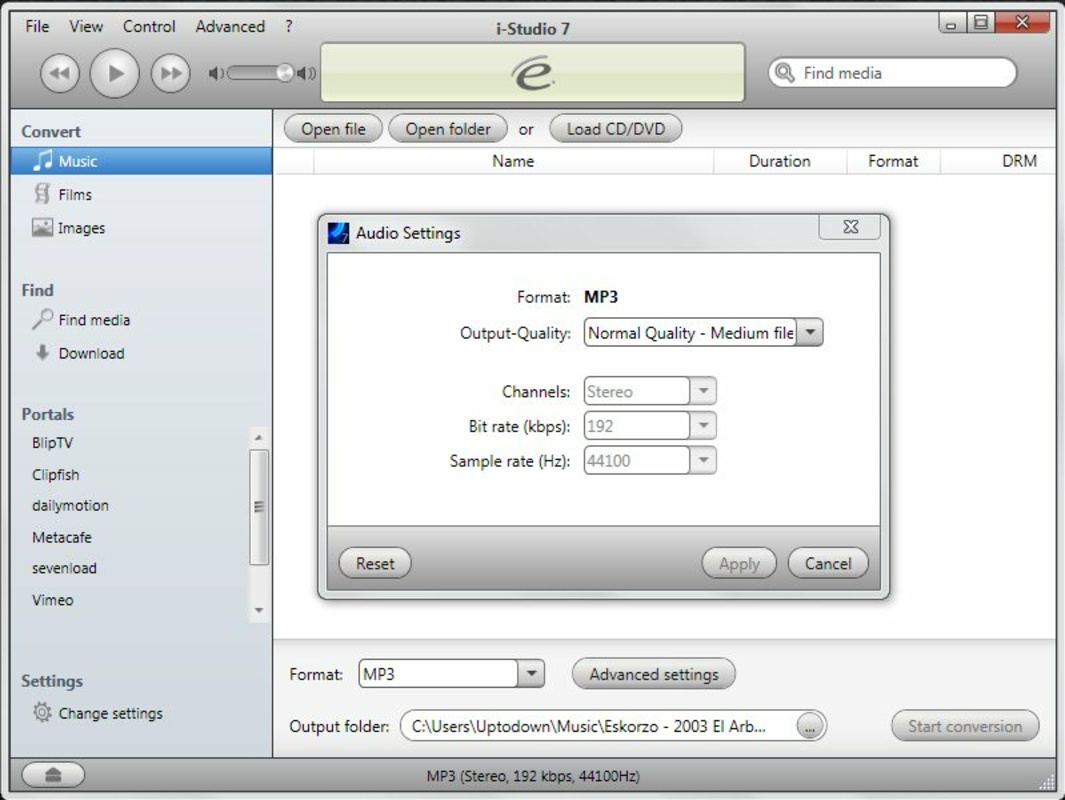
The user interface of i-Studio 7 is designed with usability in mind, featuring a clean layout that prioritizes accessibility. Navigation is straightforward, with clearly labeled options for file import, format selection, and export settings. The visual style remains functional without unnecessary embellishments, focusing on clarity and task efficiency. Users can import media files through a simple drag-and-drop mechanism or file browser, followed by selecting target formats and destination paths. The conversion process is initiated with minimal input, and progress is displayed in real time, allowing users to monitor completion status. Although the developer did not list formal performance metrics, the application’s lightweight footprint of 24.4 MB suggests efficient resource usage. The software performs reliably on standard Windows systems, with responsiveness maintained during both file import and conversion. Stability appears consistent across typical use cases, though no specific testing data was provided. The lack of reported crashes or errors in the available documentation indicates a stable user experience. Compatibility with different device categories was not fully disclosed, but the app’s focus on legacy Apple hardware implies broad support for older models. Overall, the UX is optimized for simplicity, making it accessible to non-technical users.Platform Compatibility & Technical Requirements
i-Studio 7 is designed for the Windows platform, with no information provided on specific operating system versions. The developer did not specify minimum OS requirements, nor did they list compatibility with newer Windows releases. The application’s file size is 24.4 MB, indicating a lightweight installation that requires minimal disk space. Although the developer did not disclose exact system specifications, the app’s modest size suggests it is optimized for systems with moderate hardware capabilities. Users are advised to ensure their Windows environment supports the application, particularly if using older or less common configurations. No additional dependencies or runtime environments were mentioned in the available data. Compatibility with Apple devices is confirmed through functionality, but no details were provided on supported models or iOS versions. The app’s ability to convert files for iPhones, iPods, and Macs implies broad hardware compatibility. However, specific model requirements or limitations were not outlined. Users should verify their device’s format support independently, as the software does not include built-in device detection.Pros and Cons
- Extensive format support for audio and video files
- Direct integration with iTunes for seamless media library management
- Optimization tools for audio CDs, DVDs, and audiobooks
- Support for external streaming platforms like Vimeo and ClipFish
- Lightweight installation at 24.4 MB
- Price point of $49.99 may be considered high for a single-purpose tool
- No information on updated OS compatibility or future support
- Limited documentation on system requirements and device specifications
- Release date of 2013 suggests potential outdated technology
- No mobile or macOS version available
FAQ
Is i-Studio compatible with the latest version of Windows?
The developer did not specify minimum OS requirements. Compatibility with newer Windows versions is uncertain and should be verified by the user.Can I use i-Studio to convert videos for my iPhone?
Yes, i-Studio 7 is designed to convert media files into formats compatible with iPhones, iPods, and Macs.Does i-Studio require an internet connection?
The application does not require a constant internet connection for conversion, though some features may involve online content from platforms like Vimeo.Is the software safe to download and install?
The software is distributed through official channels, and no malware has been reported. Users should download from trusted sources to ensure security.Are there regular updates for i-Studio?
The last release was in 2013. The developer did not provide information on future updates or support.Final Thoughts + CTA
i-Studio 7 remains a functional tool for users managing media on older Apple devices, offering a reliable solution for audio and video conversion with direct iTunes integration. While its age and pricing may raise concerns, its core features continue to serve a specific audience seeking compatibility with legacy hardware. The software’s lightweight design, broad format support, and intuitive interface make it a practical choice for those who need to convert and transfer media without relying on modern platforms. Despite the lack of recent updates and no macOS or mobile version, i-Studio delivers consistent performance for its intended purpose. It is best suited for users with older Apple devices, personal media libraries, or those who rely on iTunes for organization. For these individuals, the app offers a straightforward, efficient workflow. Download i-Studio nowGuides & Tutorials
How to install i-Studio
- Click the Download button above.
- Once redirected, accept the terms and click Install.
- Wait for the i-Studio download to finish on your device.
How to use i-Studio
This software is primarily used for its core features described above. Open the app after installation to explore its capabilities.
User Reviews
No reviews yet. Be the first to share your experience.
You may also like
more
Que no te pillen¡
About !Que no te pillen¡Reviewed by Jason A. BilbreyShow MoreShow Less

3D Combat Zone
About 3D Combat ZoneOriginally released in 1983, 3D Combat Zone immerses players...

666: El día del portal
About 666: El día del portalOn June 6, 2006, Agent P. Stone uncovers a sinister...

80 in 1 Best Flash games
About 80 in 1 Best Flash games 80 in 1 Best Flash games is a collection of 80 fl...

ABYSS SEEKERーーWhat Do You See Deep in The Abyss
About ABYSS SEEKERーーWhat Do You See Deep in The AbyssIn ABYSS SEEKER, players...

ACA NEOGEO THE KING OF FIGHTERS 2002 for Windows
About ACA NEOGEO THE KING OF FIGHTERS 2002 for WindowsTHE KING OF FIGHTERS 2002,...